> For the complete documentation index, see [llms.txt](https://zon.gitbook.io/zon-staff/llms.txt). Markdown versions of documentation pages are available by appending `.md` to page URLs; this page is available as [Markdown](https://zon.gitbook.io/zon-staff/zon-pos-tiles/how-to-assign-and-view-staff-commissions-in-shopify-pos.md).
# 💡How to Assign and View Staff Commissions in Shopify POS?🤔
Zon Staff Management allows merchants to create commission programs for products and assign commissions to staff directly from Shopify POS.
When a product is sold, staff or managers can assign commission from the **Order Details page** using the **Zon Staff Clock app block**. This ensures commissions are recorded accurately at the point of sale.
This guide explains **how staff and managers can view commission programs and assign commission to staff in Shopify POS**.
## **Step-by-Step Guide: Assign Commission in Shopify POS**
### **Step 1: Complete a Sale in Shopify POS**
1. Open the **Shopify POS app** on your device.
2. Add products to the cart.
3. Complete the checkout process.
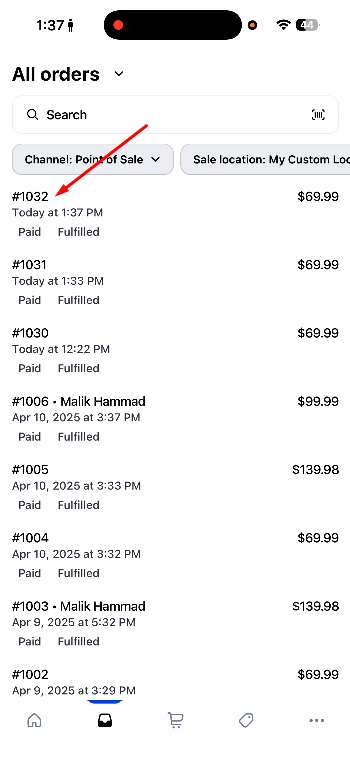
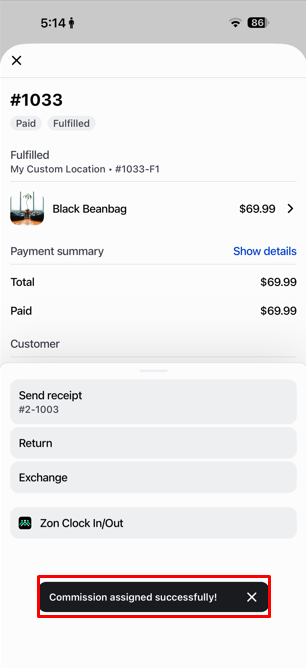
4. Once the order is completed, the **Order Details page** will open automatically.
### **Step 2: Open Zon Staff Clock In/Out**
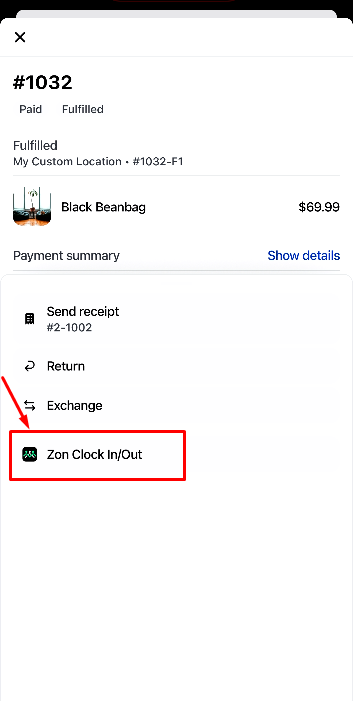
1. On the **Order Details page**, locate the **Zon Staff Clock app block** option.
1. Tap on **Zon Staff block** to open the Zon Staff Management panel.
This section connects the order with staff activity and commission programs.
### **Step 3: View Commission Programs for the Product**
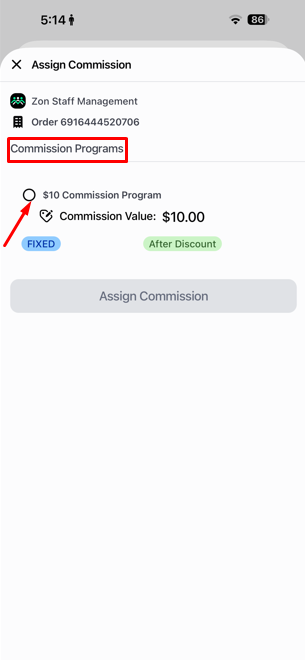
1. After opening Zon Staff Clock In/Out, you will see a list of **commission programs associated with the sold product**.
2. Each program may include:
* Commission name
* Commission type (percentage or fixed amount)
* Commission value
* Eligible staff members
This ensures staff can see which commission rules apply to the product.
### **Step 4: Select a Commission Program**
1. Choose the commission program you want to apply to the order.
2. Tap on the program to continue.
### **Step 5: Select Staff Member**
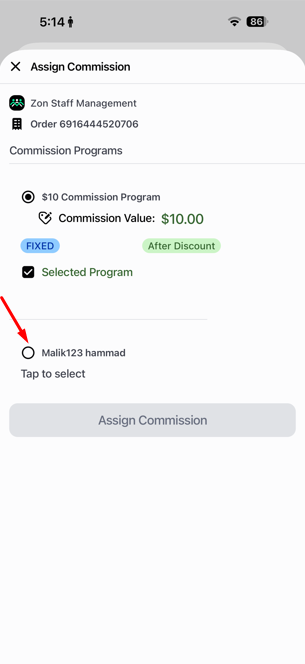
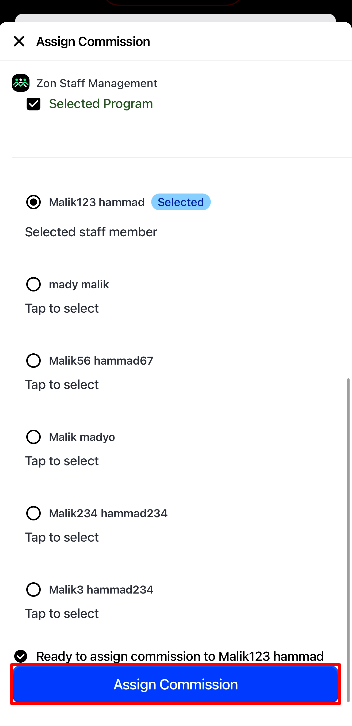
1. After selecting a commission program, a **staff member list** will appear.
2. Select the staff member who should receive the commission.
1. Click **Assign Commission** to confirm.
Once assigned, the commission will be recorded in Zon Staff Management for payroll and reporting.
## **Who Can Assign Commission?**
Commission can be assigned by:
* **Managers**
* **Staff members included in the selected commission program**
They can assign commission from:
* The **Order Details page**
* The **Order Status page**
This gives merchants control while allowing delegated staff to manage commission assignment.
## **Important Notes**
* Commission programs must be created in **Zon Staff Management** before the sale.
* Only **eligible staff listed in the commission program** can be assigned commission.
* Staff must be logged into Shopify POS for accurate assignment tracking.
* Commission can be assigned either during or after checkout from the order page.